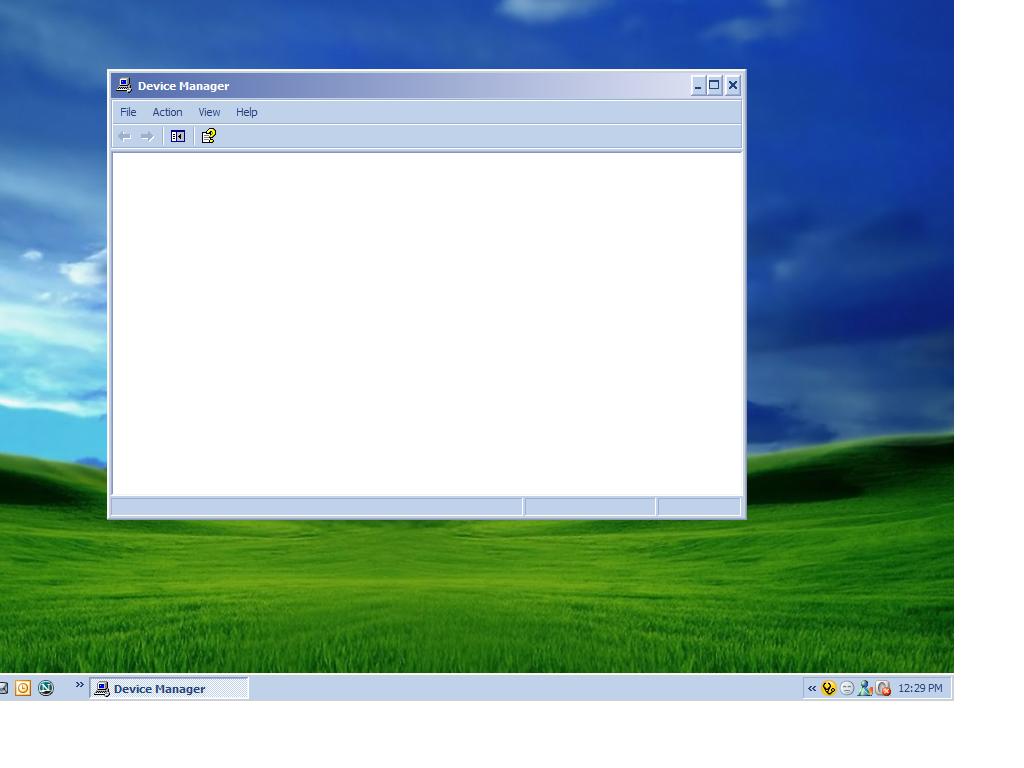
Blank Device Manager (solved)

0 comments


The Problem:-When you open device manager,you get nothing.It's totally blank.

Cause:-If Plug and Play service is either off or disabled then it may happen.Plug and Play Service enables a computer to recognize and adapt to hardware changes with little or no user input. Stopping or disabling this service will result in system instability.

Resolution:-
Start>Run>Services.msc>ok
Scroll down to Plug and Play service>Double Click on it>Make the StartUp type -Automatic>Click Ok/Apply.>Now reboot the system.

Can't get into Add/Remove Programs

0 comments


The Problem:-I can't get into add/remove programs, when I click on the icon, nothing happens.

Cause:-This problem may happen if Appwiz.cpl is no longer registered.

Resolution:-To resolve the problem one has to re-register Appwiz.cpl

Start>Run>regsvr32 appwiz.cpl>ok

This will bring a pop up "DllRegisterserver in appwiz.cpl succeeded" , click Ok.

OR DOWNLOAD IT FROM HERE
click here to download Appwiz.cpl


after downloading extract it via winrar
and copy or cut and paste it in :
C:\Windows\System32

Windows Backup Utility Error

0 comments
Image of a Western Digital 250Gb SATA Hard Dri...Image via Wikipedia

The Problem:- When I try to select files for backup to my CD-RW drive, using the Windows BACKUP utility, I get the message "The backup file name could not be used. Please ensure it is a valid path, and that you have sufficient access".

Resolution:-This happens as Removable Storage Management does not recognize CD-R, CD-RW, or DVD-R devices as backup pool media.
To resolve this issue, perform the backup to some other media type, for example, to a tape or to a hard disk.


Otherwise you may use a third party software like Firestreamer-RM,it's a backup software for Microsoft Windows, which allows you to use the Microsoft Backup Utility (NTBackup) and Microsoft SQL Server Backup (SQLBackup) to back up your data directly to a wide range of backup media, such as DVD, HDD, Iomega REV™, flash memory and so on. Firestreamer-RM supports data compression and encryption, media and drive spanning, Windows Automated System Recovery, easy backup scheduling, remote media drives and more.
Download Firestreamer-RM for a free 30-day trial.


Reference:-Windows Backup Does Not Back Up to CD-R, CD-RW, or DVD-R Devices
http://support.microsoft.com/?kbid=315255

http://www.firestreamer.com/Default.asp

how to fix the error of transcend pen drive error " insert a disk into a drive"?? (solved) also working

0 comments
Internet Download AcceleratorImage via Wikipedia
first of go to this site to download recovery tool of transcend
http://www.transcendusa.com/Support/DLCenter/index.asp?Func1No=11&Func2No=182
select your product with perfect serial no.
see the thumnail and see to it that it matches with your pendrive then download it
insert the pendrive and run
if  you r running windows vista or 7
disable UAC
frm Control Panel\User Accounts and Family Safety\User Accounts
click on trun on or off the UAC then uncheck it click on ok then restart your pc to take affect
try running the recovery tool
still if it won't work right click on icon=> go in  compatible tab +> then run this program compatible mode for  in that box select window xp sp2
and again right click on it and click on run as administration
it will run definately
then the frist screen appears (see to it that you are connected to internet)
select the size of the pendrive and proceed
it will take few seconds depending on onternet speed
and then your pendrive would work definately

Seventeen Reasons for having a Tablet PC

0 comments
Photo of HP Tablet PC running MS Windows Table...Image via Wikipedia
What is Tablet PC?

Power,mobility,versatility if all these are included in a portable computer that's approximately the size of a paper tablet,which runs on Windows XP Tablet PC Edition whch is a superset of Windows XP Pro.

Why Tablet PC?

1]It's a much newer product than the notebooks or PDA.
2]It can be used when using a keyboard in classes and meetings making things very cool and easy.
3]It has advanced handwriting and speech recognition capabilities-helping you to create,store and transmit handwritten notes and voice input.
4]It has a much longer battery life.
5]It has a high resolution-making things very clear and eye soothing.
6]It is light in weight.Yes,lighter than note books thus very much mobile in true sense.
7]It has an advanced chipset -low heat processor.
8]Most tablet PCs are are not touch sensitive so you can even rest your hand on the screen while writing-though there are exceptions also.
9]Forget your typing speed,forget whether you type by one hand -you have now got a digital pen.Just go on writing as you are used to do with your pen.
10]It supports multiple languages-Windows XP Tablet PC Edition 2005 is available in 20 languages in addition to English.
11]With the introduction of Windows XP SP2,tablet pc 2005 has become more secured than ever.
12]Developers can take advantage of the Tablet PC platform to incorporate context tagging and support for ink in Web forms.
Microsoft Windows XP Tablet PC Edition Development Kit 1.7 is available for download at The Tablet PC Developer Center on MSDN
13]There are three models of tablet pc available in the market-convertible model with a built-in keyboard or a slate model for ultimate mobility and a hybrid.Choose what you need.
14]Pen input helps to share your handwriting with others who don't have tablet pc.
15]Input panel converts your handwriting to text.
16]OneNote 2003 Service pack One has helped a tablet pc tremendously.It offers improved ink performance, customizable pens, the new media features in OneNote 2003 SP1 for video notes and the screen clipping tool.
17]Tablet PC supports instant screen rotation so that one can switch from portrait to landscape mode -and that too without restarting the computer.
Related Posts Plugin for WordPress, Blogger...
All tips and Tricks share over here are only for education purposes. Powered by Blogger.
