WHAT TO DO WHEN YOU GET BEEP SOUND FROM CPU OR NO DISPLAY

0 comments
The 536,870,912 byte (512×2 20 ) capacity of t...Image via Wikipedia
Hello guys
This problem is seen in mostly every pc when you start your pc there is no display at moniter but from the cpu a beep sound is seen on such time what to do ???

solution:
This happen mostly in the rainy dayz due to moisture
and the beep sound is of memory i.e. RAM
for this you have to do is
1st OPEN UP YOU CPU
2nd FIND THE RAM SLOTS IN YOUR MOTHERBOARD (MOBO)
3rd REMOVE THE RAM'S PRESENT IN YOUR MOBO
4th GET A RUBBER AND CLICK THE BELOW PART OF YOUR RAM (i.e. a part where ram gets attached)
5th PUT THE RAM PERFECTLY IN YOUR MOBO
6th CLOSE THE CPU
7th TRY BOOTING

ENABLE WHINDOWS 7 STYLE SUPER BAR IN UBUNTU 10.04

0 comments
Windows 7 provides the ability to pin frequently-used applications to the Taskbar, or Superbar, as it has become known. You can achieve a similar effect in Ubuntu using a Gnome panel plugin, called DockBarX, which allows you to pin, unpin, and launch applications from the panel.
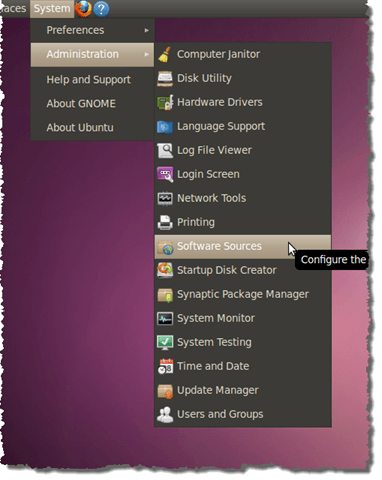
Before you install DockBarX, you must first add the source for the DockBarX package. Select Administration | Software Sources from the System menu.
Opening Software Sources
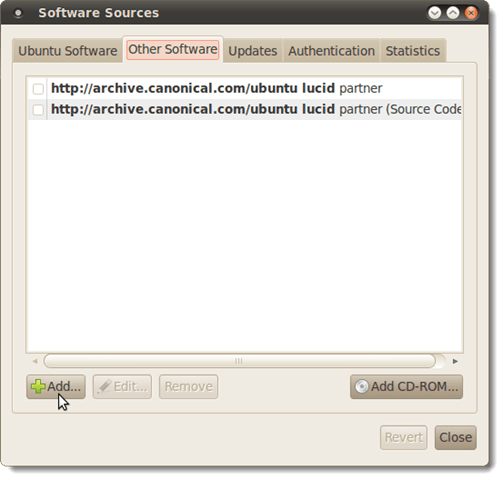
On the Software Sources dialog box, click the Other Software tab and click the Addbutton.
Software Sources dialog box - Add button
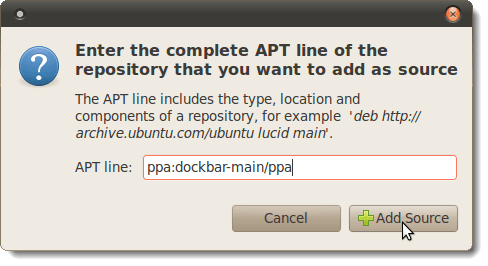
In the APT line of the dialog box that displays, enter the following line:
ppa:dockbar-main/ppa
Click Add Source.
Adding the source
Click the Close button.
NOTE: When you close the Software Sources dialog box, a dialog box may display asking you to reload to get the updated packages in the repository you added. If you see that notice, click the Reload button on the dialog box.

TORCH IS MOVING WHEN MY COMPUTER IS OPENED (IT TAKES TIME TO OPEN MY COMPUTER)

0 comments
This is a problem -when you double click on My Computer,Windows takes a long time to open it searches for files for a long time.And during that period you will find a flashlight or a torch is moving from right to left and vice-versa. 

How To Fix:- 

1ST METHODStart>Run>type in cmd>ok [note: run in vista/7 is located in start=>all programs=>accessories or you can type run in search box it will appear]

Run these commands:- 
NET STOP STISVC (This stops the service)>press ENTER
SC CONFIG STISVC START= DISABLED
 (This sets the Service startup type to disabled)>Press ENTER 

2ND METHODStart>Run>type Services.msc>ok [note: run in vista/7 is located in start=>all programs=>accessories or you can type run in search box it will appear]
From the list of Services(local) scroll down to Windows Image Acquisition>Right click on it>Click on Stop. 

NEW VERSION OF WINDOWS (FIRST LOOK)(MAYBE WINDOWS 8 )

0 comments
Watch It out here THE new version of windows will be lanunch soon Or first look for windows 8

SOFTWARE'S USEFUL FOR ALL WINDOWS XP VISTA AND 7 (EASY BCD)

0 comments
eASY BCD IS A SOFWARE WHICH HELPS YOU TO DEVLOP PERFOMANCE OF THE SYSTEM. IT ALSO LETS U TO CINFIG BOOT MENU BUT NOT TO CHANGE ITS ALSO USEFUL FOR LINUX AND MAC TOO
easyBCD is NeoSmart Technologies' multiple award-winning answer to taking control of your bootloader. EasyBCD extends and revamps the Windows Vista/Windows 7 BCD bootloader, and with EasyBCD, almost anything is possible. Setting up and configuring a dual-boot between Windows 7, Windows Vista, older versions of Windows such as XP & 2003, Linux, Ubuntu, BSD, and Mac OS X is a breeze. You just point & click and EasyBCD does the rest.
EasyBCD is geared for users of all kinds. Whether you just want to add an entry to your old XP partition or want to create a duplicate for testing purposes; if you're interested in debugging the Windows Kernel or septuple-booting your seven test operating systems, EasyBCD is the key.
  • Boot into XP/Vista/7/Ubuntu/OS X and more!
  • Boot from USB, Network, ISO images, Virtual Harddisks (VHD), WinPE, and more!
  • Repair the Windows bootloader, change your boot drive, create a bootable USB, and more!
  • Rename entries, set default boot target, change BCD timeout, hide the boot menu, and more!
  • Create your own custom boot sequence, hide drives on boot, backup and restore configurations, and more!

Related Posts Plugin for WordPress, Blogger...
All tips and Tricks share over here are only for education purposes. Powered by Blogger.